Automation API
Protocol version 2
The Automation API is intended for external automation, not a modding or plugin platform yet. The surface may grow in future releases.
External scripts and tools can drive Daggermap over a local newline-delimited JSON (NDJSON) Automation API. Enable it in Settings → General → Automation.
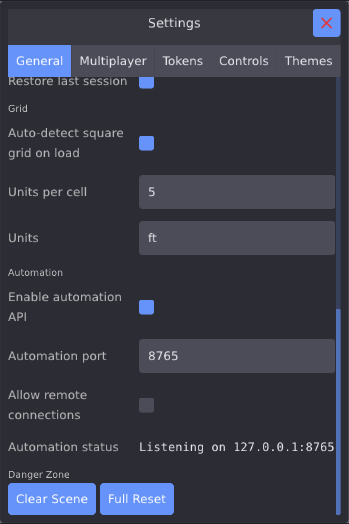
Enable Automation API
Off by default. Turning this on makes the app listen on a local TCP port.
Automation port
TCP port for incoming NDJSON connections (default 8765).
Allow remote connections
When unchecked, the API listens on localhost only.
Automation status
Shows the bound address when the API is listening.
Enable Automation API
Off by default. Turning this on makes the app listen on a local TCP port for incoming connections.
Automation port
TCP port for incoming NDJSON connections (default 8765).
Allow remote connections
When unchecked, the API listens on localhost only. Enable this only if you need to connect from another machine on your network and understand the exposure. There is no authentication — anyone who can reach the port can control the running app.
Automation status
Shows the bound address when the API is listening (for example 127.0.0.1:8765).
Protocol
| Property | Value |
|---|---|
| Transport | TCP |
| Framing | One JSON object per line (\n-terminated; \r ignored) |
| Default bind | 127.0.0.1:8765 |
| Remote bind | 0.0.0.0:<port> when Allow remote connections is on |
| Auth / TLS | None |
| Push / events | None — request/response only |
| Protocol version | 2 (advertised by hello) |
Environment overrides (native app):
| Variable | Effect |
|---|---|
DAGGERMAP_GOLEM |
Any non-empty value other than 0 forces the API on |
DAGGERMAP_GOLEM_PORT |
Overrides the listen port |
Semantics of success
A successful action or batch reply means the request was accepted for dispatch, not that the mutation has finished. On desktop, actions are queued and drained a few per frame. To confirm effects, follow up with a query (for example wait until golem.action_queue_count is 0) or wait a short moment.
A successful query or compute reply means the work finished on this line. Compute is never queued and never mutates the document.
Limits
| Limit | Value |
|---|---|
| Max request line | 64 KiB |
| Concurrent clients | 8 |
| Action queue | 256 |
| Batch size | 64 sub-requests |
| Drain per frame | 8 actions |
add_tokens per call |
64 |
Discover live limits, registered action ids, and compute ids via hello.
Coordinates, cells, and feet
The wire format for almost all geometry is world pixels. That is awkward if you think in battlemap squares or “5 ft,” but it is also stable: one number, independent of the current grid style. This subsection clarifies the conversion constants and how work in grid cells and labeled units.
Setting up your grid
Lock cell_size (and origin) before placing tokens or measuring. Every later conversion depends on those two numbers. If you skip this, you may be mixing the default 64px cell, a CV-detected size from the last background load, and whatever the user last dragged in the Grid tab.
Auto-detect (CV). On by default: Settings → General → Auto-detect grid (auto_size_grid_on_bg_load). After a load_background, Daggermap runs a computer-vision pass on the image (or video frame 1), then applies cell_size and origin to match the internal grid size to the printed grid if it detects one. A successful detect also sets (visible: false) so you do not double-draw a grid that is already in the art. It may apply an incorrect/non-matching grid on backgrounds with faint grids and or unusually patterned map designs. Scripts that must own the grid should turn it off:
{"intent":"action","action_id":"set_pref","args":{"auto_size_grid_on_bg_load": false}}
Manual / scripted grid. After the background is idle (session.net.bg_load_active is false at query depth ≥ 2, and session.grid.detect.done if you left auto-detect on):
{"intent":"action","action_id":"set_grid","args":{
  "cell_size": 64,
  "origin": [0, 0],
  "style": "square",
  "visible": true
}}
origin is percent of one cell, not world pixels. {0,0} puts the square grid at world (0,0).
Map size in world pixels. Query session.background: {loaded, tiled, width, height, asset_hash}. A non-tiled map occupies world coordinates [0, width] × [0, height]. Approximate cell counts: floor(width / cell_size) by floor(height / cell_size) when origin is {0,0}. Tiled maps are infinite; there is no finite pixel extent.
What to cache at setup
→ {"id":"g","intent":"query","path":"session.grid"}
→ {"id":"s","intent":"query","path":"session.scene"}
| Field | Meaning |
|---|---|
session.grid.cell_size |
World pixels per grid cell. Default 64. Clamped 8–516. This is the conversion constant. |
session.grid.origin |
Grid phase as percent of one cell ({x,y}), not world pixels. Default {0,0}. |
session.grid.style |
Numeric style (see set_grid strings: none / square / dots / hex_a / hex_b). |
session.scene.measure_units_per_cell |
How many labeled units one cell is worth. Default 5. |
session.scene.unit_label |
Display string only. Default "ft" if the scene has no custom label. |
There is no API that accepts feet or cell indices as placement coordinates.
Three layers
World pixels     ←  what every x/y, p0/p1, and tokens_by_id.world_position uses
      ÷ cell_size (after subtracting the grid origin in world space)
Grid cells       ←  distance.cells; AoE fill internally
      × measure_units_per_cell
Labeled units    ←  distance.units + unit_label (“ft”); in-app measure ruler
World length in feet (Euclidean, ignoring the grid):
feet = world_pixels * (measure_units_per_cell / cell_size)
Grid-step distance is the distance compute, not that Euclidean formula.
Where the map origin is
For a square (or dots) grid, percent origin converts to world pixels as:
origin_world.x = (session.grid.origin.x / 100) * cell_size
origin_world.y = (session.grid.origin.y / 100) * cell_size
With the default origin {0,0}, the grid starts at world (0, 0). To work with cell indices, +X right, +Y down puts you in the battlemap quadrant. To script in terms of (col, row) 0-based, e.g., first column and seven rows down (0, 7), use:
cell_top_left.x = origin_world.x + col * cell_size
cell_top_left.y = origin_world.y + row * cell_size
A default-sized token (one cell) belongs at cell_top_left. Optional cell_center = cell_top_left + cell_size / 2 is only needed if you pass "center": true to add_token.
Hex grids (hex_a / hex_b) use the same origin percent field, but it is fractional axial (q%, r%), not Cartesian percent. Do not use the square formulas for hex; round through the grid (or stick to world points / distance / aoe).
add_token / add_tokens / move_token / document.tokens_by_id.<id>.world_position all use stored top-left. Optional "center": true on add treats x/y as the token center (no snap). Optional space":"screen" uses framebuffer pixels instead.
To drop a default-sized token onto square cell (col, row), pass top-left:
{"intent":"action","action_id":"add_token","args":{
  "path":"/tmp/goblin.png",
  "x": 0,
  "y": 0
}}
That is cell (0,0) when cell_size is 64 and origin is {0,0}. move_token to the same {x:0,y:0} leaves it in place.
Drawings, measure strokes, viewport origin, background size, and aoe geometry are all world pixels. Drawing thickness is world pixels (not feet).
Message envelope
Every request is a JSON object. Every response is a JSON object on its own line.
Request
| Field | Type | Required | Description |
|---|---|---|---|
intent |
string | yes | hello | query | action | compute | batch |
id |
string | no | Correlation id; echoed on the response when present |
| (intent fields) | See each intent below |
Response
Success:
{"id":"1","ok":true,"result":{}}
Failure:
{"id":"1","ok":false,"error":"missing action_id"}
| Field | Type | Notes |
|---|---|---|
ok |
boolean | Always present |
result |
object | array | … | Present on success (may be {}) |
error |
string | Present on failure — human-readable, not a numeric code |
id |
string | Echoed only if the request included id |
Errors are strings such as invalid JSON, unknown intent, path not found, action queue full, unknown compute_id, or action-specific validation messages (move_token requires id, no selection, …). The last failure is also mirrored under query path golem.last_error.
Quick start
- Enable Settings → General → Automation.
- Open a TCP connection to
127.0.0.1:8765. - Write one JSON object followed by
\n; read one JSON line back.
Wire example (send the left side; receive the right):
→ {"id":"1","intent":"hello"}
← {"id":"1","ok":true,"result":{"protocol":2,"app":"daggermap",…}}

→ {"id":"2","intent":"action","action_id":"set_viewport","args":{"zoom":1}}
← {"id":"2","ok":true,"result":{}}

→ {"id":"3","intent":"query","path":"session.viewport"}
← {"id":"3","ok":true,"result":{"origin_x":0,"origin_y":0,"zoom":1}}
Any language that can open a TCP socket and encode/decode JSON works. Treat the stream as NDJSON — do not assume one recv equals one message.
Intents
hello
Capability advertisement. Optional, but recommended as the first call.
Request
{"id":"1","intent":"hello"}
Result fields
| Field | Type | Description |
|---|---|---|
protocol |
number | Wire protocol version (2) |
app |
string | "daggermap" |
app_version |
string | Optional; may be omitted |
intents |
string[] | ["hello","query","action","compute","batch"] |
features |
string[] | e.g. validate, batch, depth, path, budgeted_drain, compute |
limits |
object | action_queue, batch, drain_per_poll |
actions |
string[] | Every registered action_id |
computes |
string[] | Every registered compute_id (aoe, distance) |
query
Read a filtered snapshot of app state. Queries run immediately (read lane).
Request
| Field | Type | Required | Description |
|---|---|---|---|
path |
string | no | Dot path into the snapshot; omit or "" for the whole root |
depth |
number | no | Truncate nested depth; omit or -1 = full; 0 strips nested objects/arrays |
{"id":"q1","intent":"query","path":"session.viewport","depth":2}
Root keys (built only as needed for the requested path):
| Path | Contents |
|---|---|
golem |
Automation listener status and queue depth |
session |
Viewport, selection, document meta, grid, scene; at depth ≥ 2 also UI actions catalog and multiplayer/net |
document |
Saved document JSON; at depth ≥ 2 also tokens_by_id |
Unknown top-level paths return "path not found".
golem
| Field | Type | Description |
|---|---|---|
enabled |
boolean | Automation preference (or env override) wants the listener on |
active |
boolean | Listening and bind succeeded |
env_override |
boolean | Forced on via DAGGERMAP_GOLEM |
port |
number | Configured port |
listening |
boolean | Socket is listening |
bind_failed |
boolean | Port could not be bound |
client_connected |
boolean | At least one client connected |
client_count |
number | Connected clients |
request_count |
number | Requests handled since start |
action_queue_count |
number | Accepted actions not yet applied |
action_queue_cap |
number | Queue capacity |
drain_per_poll |
number | Max actions drained per frame |
bulk_insert_pending |
number | Tokens still waiting in the bulk insert queue |
bulk_insert_cap |
number | Bulk insert capacity |
last_error |
string | Last failure message (or "") |
session (depth ≥ 1)
| Path | Shape |
|---|---|
session.viewport |
{origin_x, origin_y, zoom} — world origin + zoom |
session.selection |
string[] of token UUID7 ids |
session.drawing_selection |
string[] of drawing UUID7 ids |
session.document_path |
string |
session.document_open |
boolean |
session.window_width / session.window_height |
number (framebuffer pixels) |
session.active_scene_id |
string |
session.measurements_count |
number (count only; stroke geometry is not dumped) |
session.background |
{loaded, tiled, width, height, asset_hash} — size in world pixels |
session.grid |
{cell_size, visible, style, line_size, origin:{x,y}, detect:{…}} |
session.scene |
{projection_mode, snap_on_drop, draw_origin_snap, measure_units_per_cell, unit_label} |
projection_mode: 0 top-down, 1 isometric. draw_origin_snap: 0 free, 1 vertex, 2 cell.
At depth ≥ 2:
| Path | Shape |
|---|---|
session.actions |
[{id, label, section, description?}] — UI / Controls catalog |
session.net |
Multiplayer and asset-sync snapshot (room_id, broker_url, state, kind, peer/sync counters, downloads, …) |
document
Document save payload (schema_version, scenes, assets, drawings, …). When depth is omitted/-1 or ≥ 2, includes:
"tokens_by_id": {
  "<uuid7>": {
    "id": "<uuid7>",
    "path": "…",
    "world_position": {"x": 0, "y": 0},
    "scale_x": 1,
    "scale_y": 1,
    "z_order": 0,
    "name": "",
    "fields": {}
  }
}
world_position is the token top-left in world pixels. Custom fields objects include key, label, current, note_text, max, show_on_canvas, label_size_dp, color.
Each scene in document.scenes[] includes id, sort_order, snap/measure fields, drawings[] (with p0/p1/points in world pixels and is_fog), tokens, grid, and background.
Prefer narrow paths (session.selection, document.tokens_by_id.<id>) over dumping the whole root when scripting.
action
Validate and enqueue (or, on web, immediately run) a single mutation.
Request
| Field | Type | Required | Description |
|---|---|---|---|
action_id |
string | yes | Registered action name |
args |
object | no | Action parameters |
{"id":"a1","intent":"action","action_id":"add_token","args":{"path":"/path/to/token.png","x":0,"y":0}}
Success result: {}
Common errors: missing action_id, unknown action_id, action queue full, or a validator string.
compute
Synchronous read with arguments. Same line returns ok + result. Never queued; does not mutate the document.
Request
| Field | Type | Required | Description |
|---|---|---|---|
compute_id |
string | yes | aoe or distance |
args |
object | usually | Compute parameters |
{"id":"c1","intent":"compute","compute_id":"distance","args":{"a":"<uuid>","b":"<uuid>"}}
aoe
Geometry matches draw_rectangle / draw_circle / draw_cone. Does not insert a drawing.
| Arg | Notes |
|---|---|
kind |
rectangle | circle | cone (aliases draw_* accepted). Can be inferred from point keys. |
| point pairs | Rectangle: top_left/a + bottom_right/b. Circle: center/a + edge/b. Cone: apex + base_mid, optional angle_deg. World pixels. |
fill_policy |
shape | touch | center | half | full. Default: scene/mneme fill policy. |
exclude_id |
Optional caster token id |
exclude_origin |
Optional world [x,y] / origin cell to skip |
Result: { "token_ids": ["…"] } — tokens whose occupied AABB intersects the covered cells (or the geometric shape when fill_policy is shape).
distance
| Arg | Notes |
|---|---|
a, b |
Token UUID7 strings or world [x,y] / {x,y} |
mode |
center (default): centers / points. touch: edge-to-edge AABBs and occupied-cell steps |
Use touch + cells for melee reach (adjacent footprints are 1; overlapping is 0). Use touch + world for Euclidean ranged gap (0 if the boxes overlap or share an edge). Points have no extent.
Result:
| Field | Meaning |
|---|---|
cells |
Discrete grid steps (square Chebyshev; hex cube distance) |
world |
Euclidean length in world pixels (center between points; touch between AABBs) |
units |
cells * measure_units_per_cell (typically feet) |
unit_label |
Scene label ("ft" by default) |
batch
Send up to 64 nested requests in one round-trip. Nested intents may be hello, query, action, compute, or nested batch.
Request
{
  "id": "b1",
  "intent": "batch",
  "requests": [
    {"id": "a1", "intent": "action", "action_id": "select_all_tokens"},
    {"id": "q1", "intent": "query", "path": "session.selection"}
  ]
}
Success result: { "responses": [ <envelope>, … ] }
The outer envelope is ok: true even when some sub-requests fail — inspect each entry in responses. Nested actions are still queued; nested query / compute still run immediately.
Actions
Two families share the same action intent:
- Automation actions — purpose-built for scripting (tokens, viewport, draw, net, …).
- UI actions — the same ids shown under Settings → Controls, so anything bindable in the app can be invoked over the API.
Call hello (or query session.actions at depth ≥ 2) for the live catalog.
Coordinates (summary)
| Convention | Used by |
|---|---|
World x/y (default for placement & draw) |
add_token, add_tokens, move_token (stored top-left), draw_*, measure_*, aoe / distance points |
| Screen pixels | pan_view, zoom_*, select_token_under_cursor; add_token / add_tokens when space is "screen" |
| Cell percent | set_grid origin / origin_x+origin_y; session.grid.origin |
| Point pairs | Arrays [x, y] under named keys (start/end, or aliases a/b) |
Colors are strings resolved like the in-app pen (named colors or #RRGGBB / #RRGGBBAA where supported).
Document, scenes & viewport
action_id |
Args | Notes |
|---|---|---|
open_document |
path (string, required) |
|
save_document_as |
path (optional) |
No path → no-op |
set_active_scene |
id (UUID7 string) and/or index (0-based integer) |
At least one required. index follows document.scenes / sort_order order. If both are set they must name the same scene. Does not persist the active scene back to the save file. |
add_scene |
— | Copies snap/units/grid overlay from the active scene, not tokens/drawings |
remove_scene |
id |
Refuses the last scene. Does not open the UI confirm dialog |
reorder_scene |
id, index |
0-based sorted index |
duplicate_scene |
id optional |
Omitting id duplicates the active scene |
load_background |
path (required) |
|
clear_background |
— | |
detect_grid |
— | Needs a non-tiled background; poll session.grid.detect |
set_grid |
optional fields below | At least one field required |
set_viewport |
origin_x?, origin_y?, zoom? (> 0) |
Partial updates; world origin |
set_projection_mode |
projection_mode 0|1 and/or isometric bool |
Needs an active scene |
set_gc_policy |
max_state_bytes?, tombstone_retention_days?, run_gc? (default true) |
At least one policy field |
set_grid fields (all optional, at least one required):
| Arg | Notes |
|---|---|
cell_size |
World pixels per cell (8–516) |
origin or origin_x+origin_y |
Percent of a cell, same as session.grid.origin |
style |
none | square | dots | hex_a | hex_b (or 0–4) |
visible |
Overlay on/off (does not by itself disable snap) |
line_size |
1–8 |
color |
RRGGBB or RRGGBBAA |
snap_on_drop |
Set, not toggle |
draw_origin_snap |
0|1|2 or free|vertex|cell |
measure_units_per_cell |
Labeled units per cell (clamped ~0.01–10000) |
unit_label |
e.g. "ft" |
Keep toggle_snap_to_grid as a UI toggle if you want it; prefer set_grid snap_on_drop for scripts.
Settings
action_id |
Args | Notes |
|---|---|---|
set_pref |
one or more mneme keys from Settings | Same names as the UI. Query session.prefs. Unknown keys rejected |
Writable keys include General (auto_size_grid_on_bg_load, golem_enabled, golem_port, golem_allow_remote, scales, language, …), Tokens (including token_use_full_resolution), Multiplayer (broker_url, net_display_name, …), and Themes (ui_theme plus style_* RRGGBBAA hex). Keybindings stay Clinamen action ids — not the opaque binding.json blob. Draw style prefs stay on set_draw_style; scene units stay on set_grid.
Tokens
action_id |
Args | Notes |
|---|---|---|
add_token |
path or asset_hash; optional x,y; optional space="screen"; optional center bool |
No xy → spiral place; selects the new token. x/y are stored top-left unless center is true |
add_tokens |
one of: dir; positions + shared path/hash; tokens[] |
Max 64; see shapes below. Optional center (also per tokens[] entry) |
move_token |
id, x, y |
World top-left; id is UUID7 string |
set_token_scale |
id + (scale or scale_x+scale_y) |
|
set_token_name |
id, name |
|
set_token_field |
id, key, plus any of label, current, note_text, max, show_on_canvas, label_size_dp, color |
Creates the key if missing; max 16 fields. Omit = keep |
set_token_fields |
id, fields[] |
Replace-all |
remove_token_field |
id, key |
|
select_tokens |
id or ids[]; optional additive |
Empty / omit ids → clear. View-state only |
copy_tokens / cut_tokens |
— | Requires selection |
paste_tokens |
— | Requires clipboard |
add_tokens shapes:
{"dir": "/path/to/folder"}
{"path": "/tok.png", "positions": [[0, 0], [64, 0]]}
{"tokens": [{"path": "/a.png", "x": 0, "y": 0}, {"path": "/b.png", "x": 64, "y": 0}]}
Prefer add_tokens over many tiny add_token calls when dumping assets in. Positions in those examples are top-left on a default 64px square grid (cells (0,0) and (1,0) at origin {0,0}).
Name/field/move stay id-addressed; they do not require selection.
Draw & measure
World-space strokes. Point-pair shapes accept primary keys or a/b aliases.
action_id |
Args |
|---|---|
draw_freehand |
points (≥ 2 × [x,y]); optional color, thickness, fog/is_fog, snap |
draw_rectangle |
top_left/a + bottom_right/b; optional outline_color, fill_color, thickness, fog/is_fog, snap |
draw_line |
start/a + end/b; optional colors / thickness / fog / snap |
draw_circle |
center/a + edge/b; optional colors / thickness / fog / snap |
draw_cone |
apex, base_mid; optional outline_color, fill_color, thickness, angle_deg (default 90), fog, snap |
draw_freehand_commit |
points or pattern (rdp_zigzag|sine) + point_count; optional zoom |
set_drawing |
id plus any of p0, p1, points, fog/is_fog, fill_color |
remove_drawing |
id |
select_drawings |
id or ids[]; optional additive |
set_draw_style |
any of outline_color/color, line_size, thickness, fill_color/fill_hex, fill_alpha, fill_policy, fog/fog_enabled |
clear_my_drawings / clear_all_drawings / clear_history |
— |
measure_line |
start/a + end/b |
measure_freehand |
same point sources as freehand commit helpers |
clear_measurements |
— |
snap: omit → follow scene AND-rule (draw_origin_snap and snap_on_drop); none/free/0 → no snap; vertex/cell override. Default scene draw_origin_snap is free, so omitted snap usually does not snap.
Multiplayer
action_id |
Args | Notes |
|---|---|---|
net_configure |
optional broker_url, room_id, display_name, room_key, kind, peer_candidate, stun_host, stun_port |
Empty room_key clears E2EE passphrase |
net_connect |
same as configure; needs room_id (here or previously) |
|
net_disconnect / net_retry |
— | |
net_set_peer_candidate |
peer_candidate |
|
cancel_bg_load / cancel_asset_sync |
— |
UI actions (Controls)
Every id under Settings → Controls is registered as an action_id. Examples:
| Section | Ids |
|---|---|
| Session | undo, redo, open_document, save_document_as |
| UI | back, select, toggle_hint_overlay, toggle_settings, toggle_drawer, open_action_assets, open_action_map, open_action_scenes, open_action_draw, open_action_measure, open_action_grid |
| Navigation | pan_view, zoom_in, zoom_out, pinch_zoom, reset_view, fill_view, fit_view_to_content |
| Tokens | select_token_under_cursor, select_all_tokens, clear_selection, open_token_details, set_token_scale_up, set_token_scale_down, remove_token, copy_tokens, cut_tokens, paste_tokens, move_token_north / _south / _east / _west |
| Draw | set_shape_freehand, set_shape_rectangle, set_shape_cone, set_shape_line, set_shape_circle, clear_all_drawings, clear_my_drawings |
| Menu | toggle_draw_mode, toggle_measure, cycle_draw_shape, toggle_snap_to_grid, toggle_background_tiled, toggle_isometric_view, toggle_grid_adjust_handles, toggle_video_controls |
Args for selected UI actions
| Action | Args |
|---|---|
pan_view |
phase: "down" | "move" | "up" (default "down"); optional screen x,y (default window center). move requires a prior down. |
pinch_zoom |
scale (number); optional screen x,y |
zoom_in / zoom_out |
optional screen x,y (focal point) |
select_token_under_cursor |
optional screen x,y |
move_token_* |
optional steps (default 1); requires selection |
Selection-required actions fail validation with "no selection": move_token_*, remove_token, set_token_scale_up / _down, cut_tokens, copy_tokens. (remove_token also deletes the current drawing selection.)
Examples
Cache the grid, then place a token on cell (0, 7)
Assume a default square grid (cell_size 64, origin {0,0}). Top-left of column 0, row 7:
x = 0 + 0 * 64 = 0
y = 0 + 7 * 64 = 448
→ {"id":"1","intent":"query","path":"session.grid"}
← {"id":"1","ok":true,"result":{"cell_size":64,"origin":{"x":0,"y":0},"style":1,…}}

→ {"id":"2","intent":"action","action_id":"add_token","args":{"path":"/tmp/goblin.png","x":0,"y":448}}
← {"id":"2","ok":true,"result":{}}
Place a token and read it back
→ {"id":"1","intent":"action","action_id":"add_token","args":{"path":"/tmp/goblin.png","x":144,"y":72}}
← {"id":"1","ok":true,"result":{}}

→ {"id":"2","intent":"query","path":"session.selection"}
← {"id":"2","ok":true,"result":["018f…"]}

→ {"id":"3","intent":"action","action_id":"move_token","args":{"id":"018f…","x":216,"y":72}}
← {"id":"3","ok":true,"result":{}}
Grid-step distance in feet
→ {"id":"d","intent":"compute","compute_id":"distance","args":{"a":"018f…","b":"0190…"}}
← {"id":"d","ok":true,"result":{"cells":1,"world":64,"units":5,"unit_label":"ft"}}
Melee / edge-to-edge (occupied cells, AABB gap):
→ {"id":"t","intent":"compute","compute_id":"distance","args":{"a":"018f…","b":"0190…","mode":"touch"}}
← {"id":"t","ok":true,"result":{"cells":1,"world":0,"units":5,"unit_label":"ft"}}
AoE without drawing
→ {"id":"a","intent":"compute","compute_id":"aoe","args":{"kind":"rectangle","top_left":[0,0],"bottom_right":[64,64],"fill_policy":"touch"}}
← {"id":"a","ok":true,"result":{"token_ids":["018f…"]}}
Draw a measured line
→ {"id":"4","intent":"action","action_id":"draw_line","args":{"start":[0,0],"end":[144,0],"outline_color":"#c44","thickness":4}}
← {"id":"4","ok":true,"result":{}}
Validation failure
→ {"id":"5","intent":"action","action_id":"move_token","args":{"x":1}}
← {"id":"5","ok":false,"error":"move_token requires id"}
Wait for the write queue to drain
→ {"id":"6","intent":"query","path":"golem.action_queue_count"}
← {"id":"6","ok":true,"result":0}